
A cloud desktop for ads is a private computer in the cloud where an AI builds and checks your campaigns inside your own Facebook and Google Ads accounts. You sign in once, and every campaign stays in your name, not in an agency's. Below you will see how it works, what it costs, and how an MRI software company had its Meta login step done and its campaign set built on its Cloud Desktop the same day.
At a glance
| Service | Cloud Desktop: a private cloud computer where the AI works in your own accounts |
|---|---|
| Who it is for | Business owners and agencies who want AI to run ads in accounts they own |
| Case | An AI radiology software company (brain and spine MRI) |
| Period | November 2026, one working day |
| Result | Meta login step done the same day and its campaign set built on the Cloud Desktop |
What a cloud desktop for ads is
Most small businesses in India hand their ads to someone else in one of two ways. Either they share their passwords, or the agency runs the ads from its own account. Both leave the owner with little control. If the relationship ends, the account history, the audiences and the lead data may not be easy to take back.
A Cloud Desktop works differently. Each BOOSTMYSITES client gets a private computer that lives in the cloud. You open it, and you sign in once to the tools your marketing needs: Facebook, Google Ads, ChatGPT and so on. From then on, the AI does its work on that computer, inside those accounts. It builds campaigns there, and it checks them there.
Think of it as a desk in an office that belongs only to you. The AI sits at that desk and uses your accounts, the way a trusted assistant would. Nothing is moved into our name. Your ad budget is paid by you directly to Meta or Google from your own ad account, so there is no middleman holding your money.
The price is clear. Cloud Desktop costs 7,500 credits a month and is paid by its own purchase. If you start on the Basic plan, about ₹5,768 including GST, you get the first pack, Cloud Desktop and WhatsApp automation together.
How it works, step by step
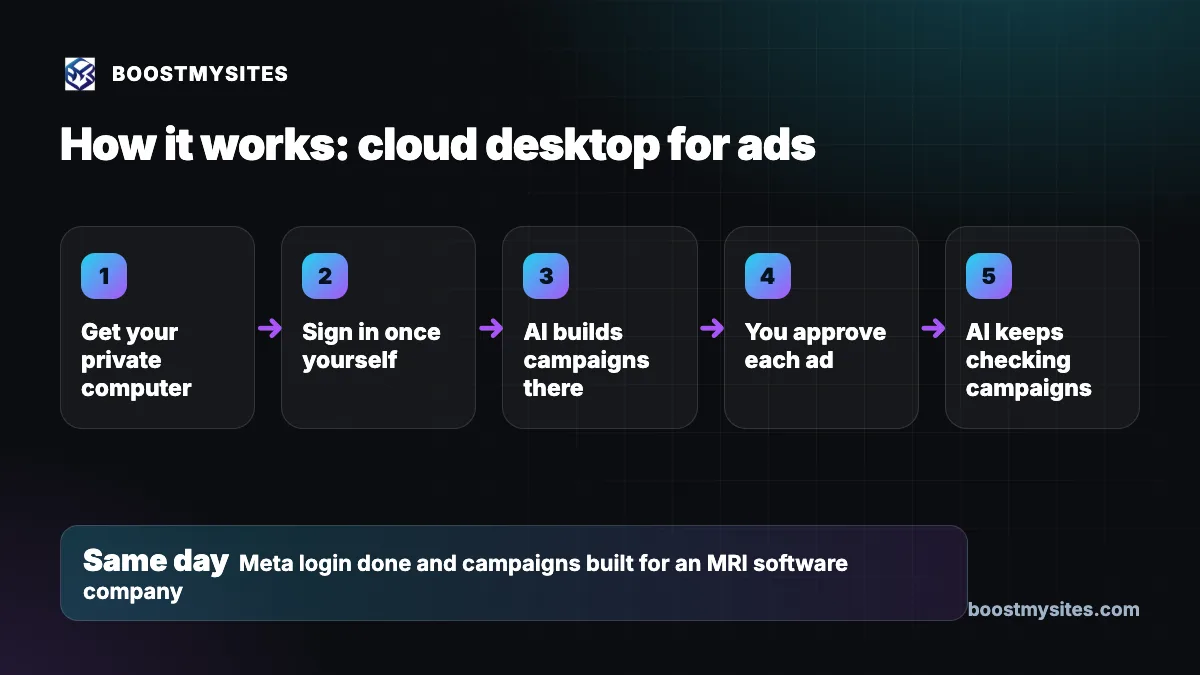
- Get your private computer Once you join, a private cloud computer is set up for your business. It is yours alone and is not shared with other clients.
- Sign in once yourself You open the Cloud Desktop and sign in to Facebook, Google Ads, ChatGPT and any other tool the plan needs. You do this one time, on your own, with your own login.
- AI builds campaigns there The AI uses those signed in accounts to build your campaigns: the audience, the wording, the pictures and the budget. Every ad is built paused, in your own account.
- You approve each ad Nothing goes live without your yes. You get an approval link that shows the exact ad, and you approve it or ask for changes.
- AI keeps checking campaigns After an ad runs, the AI keeps checking the campaign on the same computer, so problems are seen in the real account and not guessed from a distance.
Case study: an MRI software company set up the same day
The challenge
The client is a company that makes AI software for brain and spine MRI reporting. Its founder wanted ads on Meta and Google, run in the company's own accounts. For that, the AI needed a way to work inside those accounts while they stayed fully in the company's name. A setup that depends on forms, screen shares and passwords sent back and forth is exactly what slows most new clients down.
What we did
The company got its own Cloud Desktop. The founder signed in on it, including the Meta login. Once she had signed in, the AI could work inside her own accounts from that cloud computer. The growth plan and the full campaign set were then built there, covering Meta and Google campaigns, all paused and waiting for her approval. If you want to see how that plan came together from her brief, read how an AI growth plan turns a brief into ready campaigns.
The results
Her Meta login step showed as done the same day, and her campaign set was built on the Cloud Desktop. The accounts stayed in the company's name the whole time. No ad went live on its own: each one waits for the founder's approval link. Results from the ads themselves will depend on the market, the offer and the budget, so we report those only when the ads have run.
The lesson
The slow part of starting ads is usually access, not ideas. When the owner signs in once on a computer the AI can use, the setup that often drags on for days can be done the same day, and the owner keeps full ownership of every account.
Common mistakes this fixes
- Ads run from someone else's account. With Cloud Desktop the campaigns are built in your own ad accounts, so the history stays with your business.
- Passwords sent over chat. You sign in yourself, once, on your own private computer, instead of sending logins to a team.
- Ad money paid to a middleman. Your budget goes from your ad account straight to Meta or Google.
- Ads that go live without the owner knowing. Every ad is built paused and runs only after your approval link.
- Setup that takes weeks. Signing in once lets the AI start building the same day.
Who should use it
A cloud desktop for ads suits a small business owner who wants ads on Facebook, Instagram and Google without hiring a full team, and who wants the accounts to stay in the company's name. It also suits agencies that run ads for many clients and want each client's work kept in that client's own accounts. If you do not have the time to sit at a laptop and build campaigns, this is the best way to let the AI do that work while you stay in control.
You can read more about each service in the BOOSTMYSITES blog.
Frequently asked questions
What is a cloud desktop for Facebook and Google ads?
It is a private computer in the cloud where you sign in once to Facebook, Google Ads, ChatGPT and other tools. The AI then builds and checks your campaigns on that computer, inside your own accounts, so everything stays in your name.
Do I need to keep my own laptop on for the AI to work?
The work happens on the cloud computer, not on your laptop. You only need to sign in once on the Cloud Desktop so the AI can use your accounts there. If you want an AI agent to work on your own laptop instead, see the separate post on Remote Desktop with an AI agent.
How much does a cloud desktop for ads cost in India?
Cloud Desktop costs 7,500 credits a month and is paid by its own purchase. The Basic plan, about ₹5,768 including GST, bundles the first pack, Cloud Desktop and WhatsApp automation. Your ad budget is separate and is paid by you directly to Meta or Google.
Who owns the ad accounts and the campaigns?
You do. The AI works in your own Facebook and Google Ads accounts, so the campaigns, audiences and history belong to your business.
Can the AI publish an ad without asking me?
No. Every ad is built paused in your own account. You get an approval link that shows the exact ad, the audience and the budget, and it goes live only after you approve it.
If you want your ads built and checked in your own accounts, from a private computer that works for you, start with BOOSTMYSITES for $1. Then read how ad approval links keep every ad under your control and how the client onboarding autopilot takes you from payment to first ad.