
Ad reports with screenshot proof mean you never have to take anyone's word for what your ads are doing. Every day you get a picture report on Telegram, and any question about money is answered with a screenshot of your own Ads Manager. This post explains how it works and how it settled a Kolkata client's worry about ₹4,000 spent in one day.
At a glance
| Service | Daily ad reports with screenshot proof |
|---|---|
| Who it is for | Business owners running Meta or Google ads who want clear numbers without opening Ads Manager |
| Case | A client in Kolkata worried about one day of spend |
| Period | From the day a campaign goes live, then every day |
| Result | The money question got a screenshot of the client's own Ads Manager with the numbers, not a "we are rechecking" reply |
What ad reports with screenshot proof are
Most business owners do not open Ads Manager every day. The screens are busy, the numbers sit in many columns, and there is a shop, a clinic or a sales team to run. So owners depend on someone telling them how the ads are doing. The problem is that a message from an agency is only words. If the words say "all good" and the owner feels the money is going nowhere, trust breaks.
A picture report fixes the first half of this. It is one image with the numbers that matter for a small business:
- Leads: how many people asked about your offer.
- Cost per lead: what one enquiry cost you.
- CTR: click-through rate, the share of people who saw the ad and tapped it.
- CPC: cost per click, what one tap on the ad cost.
- Spend: how much went out.
- A 7-day chart: so you see the trend, not one good or bad day.
Leads, cost per lead, CTR and CPC are each shown against yesterday, so you can tell at a glance whether things got better or worse. The report arrives on Telegram when a campaign goes live and then every day.
The second half is proof. When you ask a money question, such as "how much did we spend today?" or "is that ad still running?", the answer is a screenshot of your own Ads Manager that shows what runs, what spent and what is off. Your ads run in your own ad account, and you pay your ad budget directly to Meta or Google. So the screenshot comes from the same place your bill comes from. Nobody can dress it up. Reports are one part of how we work; the BOOSTMYSITES blog explains every service in the same plain way.
How it works, step by step
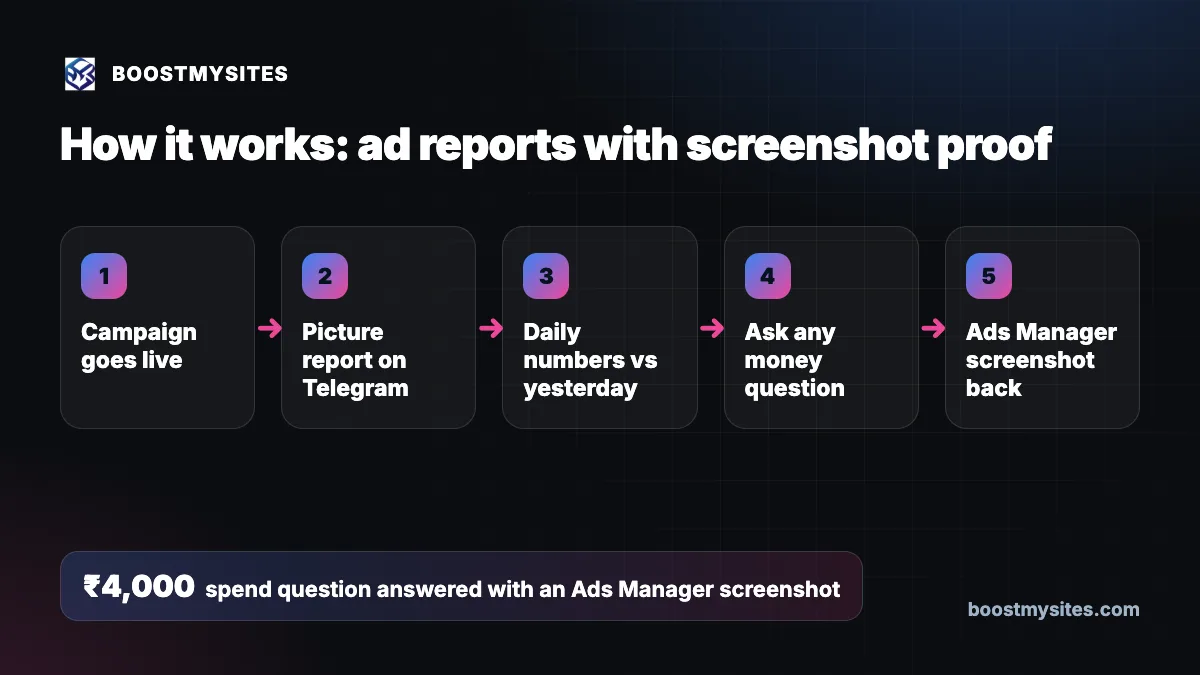
- Campaign goes live Nothing goes live without your approval. Once you approve the ad through your approval link and it starts running in your own account, reporting begins.
- Picture report on Telegram On go-live you get the first picture report on Telegram, so you know the campaign is really running and what it looks like from day one.
- Daily numbers vs yesterday Every day a new report arrives with leads, cost per lead, CTR, CPC and spend, compared with yesterday, plus the 7-day chart. You read it in under a minute.
- Ask any money question If something worries you, ask it in plain words. "Why did we spend so much?" is a fair question and it deserves a real answer.
- Ads Manager screenshot back The answer is a screenshot of your own Ads Manager with the numbers written next to it: which ads are running, what each one spent, and which ones are switched off.
Case study: a ₹4,000 day in Kolkata
The challenge
A client in Kolkata sent a message that every ad manager dreads: "₹4,000 gone in one day on junk leads". Read it the way the owner meant it. Money had gone out, the leads looked poor, and the owner was not sure anyone was watching.
The easy reply to a message like this is "we are rechecking". It sounds polite, but it says nothing. It gives no number, no picture and no time. The owner is left waiting with the same worry, and often a bigger one. When the question is about money, words without proof make a worried owner more worried.
What we did
Instead of a holding line, we built a proof command. It reads the client's own Ads Manager and posts a screenshot with the numbers: what is running, what was spent and what is switched off. The owner does not need to log in, find the right date range or understand the columns. The answer to a money question is now the account itself.
The worry about junk leads is a separate problem, and it needs its own fix. Spend proof tells you where the money went. Lead quality needs each ad judged by its real leads, not by clicks. We explain that method in our post on ad stop-loss and lead quality.
The results
The client's question got a direct answer from its own Ads Manager, with the numbers next to the screenshot, instead of "we are rechecking". We are not publishing any other numbers from this case, because the point here is not a cost figure. The point is the way a money question gets answered. Since this case, that is how money questions are handled: with a screenshot of the client's own account.
The lesson
When money is the worry, proof beats promises. An owner who can see the spend in their own Ads Manager can make a calm decision: keep the ad, change it or stop it. An owner who only gets "we are checking" can only wait and worry.
Common mistakes this fixes
- Holding replies. "We are rechecking" with no number or picture leaves the owner in the dark.
- Long text reports. Paragraphs of numbers nobody reads. One picture with the key numbers gets read.
- No comparison. A cost per lead alone means little. Against yesterday and a 7-day chart, it tells a story.
- Numbers that do not match the bill. A report from a separate tool can differ from what Meta or Google charges. A screenshot of your own Ads Manager is the same source as your bill.
- Waiting for a weekly report. If the worry is today's spend, the answer should come today.
Who should use it
Any small business in India or abroad that runs Meta or Google ads and does not open Ads Manager every day. It suits owners who have handed their ads to a team or an agency and want to stay in control, and owners on a daily budget who want to see each day's spend. If you have ever asked "where did my money go?", this is for you.
Frequently asked questions
How do I get a daily Facebook ads report without logging in to Ads Manager?
Once your campaign is live, a picture report arrives on Telegram every day with leads, cost per lead, CTR, CPC and spend against yesterday, plus a 7-day chart. You do not need to log in to read it.
Can I get proof of how much my ads spent today?
Yes. Ask the question and the answer is a screenshot of your own Ads Manager, showing what runs, what spent and what is off, with the numbers written next to it.
Who pays the ad budget, and where does the money go?
You pay your ad budget directly to Meta or Google from your own ad account. Ad reports with screenshot proof come from that same account, so the report and the bill come from one source.
What should I do if my ads bring junk leads?
First see the spend clearly, then judge each ad by the real leads it brings. Results depend on your market, offer and budget, and no one can promise a fixed number of good leads. Ads that bring junk can be stopped or changed with your approval.
Can anyone change my ads without asking me?
No. Every new ad and every change waits for your approval through an approval link. Reports show you what is happening. They do not change anything on their own.
If you want ad reports with screenshot proof for your own campaigns, start with BOOSTMYSITES for $1 and see your first report the day your ad goes live. You can also see how lead tracking with one CRM for every source works and how AI ad optimisation with a second review keeps campaigns honest.